NVIDIA GPU MPS and MIG dynamic slice plugin
Special Thanks
The original Dynamic MIG feature was implemented with the help of @sailorvii. The v2.10.0 reservation-first refactor was contributed by @FouoF.
Introduction
The NVIDIA GPU built-in sharing method includes: time-slice, MPS and MIG. The context switch for time slice sharing would waste some time, so MPS and MIG are preferred. A GPU exposes several MIG profiles, but a fixed whole-GPU geometry must be chosen before workloads arrive. Switching that geometry usually means draining the GPU. The goal is an automatic slice plugin that creates a MIG instance when the user requires it.
From v2.10.0, HAMi uses a reservation-first model: the device plugin publishes allowlisted profiles and legal placements discovered through NVML, the scheduler reserves a specific profile and placement for each Pod, and the device plugin creates the GI/CI during Allocate. The instance is reclaimed when the Pod terminates.
For the scheduling method, node-level binpack and spread will be supported. Referring to the binpack plugin, the scheduler considers CPU, Mem, GPU memory and other user-defined resources. HAMi is done by using hami-core, which is a cuda-hacking library. But MIG is also widely used across the world. A unified API for dynamic-mig and hami-core is needed.
Targets
- CPU, Mem, and GPU combined schedule
- GPU dynamic slice: HAMi-core and MIG
- Support node-level binpack and spread by GPU memory, CPU and Mem
- A unified vGPU Pool different virtualization techniques
- Tasks can choose to use MIG, use HAMi-core, or use both.
Config maps
- hami-scheduler-device-configMap This configmap defines the plugin configurations including resourceName, the MIG profile allowlist, and node-level configurations.
apiVersion: v1
data:
  device-config.yaml: |
    nvidia:
      resourceCountName: nvidia.com/gpu
      resourceMemoryName: nvidia.com/gpumem
      resourceCoreName: nvidia.com/gpucores
      migProfileAllowlist:
      - models: [ "A30" ]
        profiles: [ "1g.6gb", "2g.12gb", "4g.24gb" ]
      - models: [ "A100-SXM4-40GB", "A100-40GB-PCIe", "A100-PCIE-40GB" ]
        profiles: [ "1g.5gb", "2g.10gb", "3g.20gb", "7g.40gb" ]
      - models: [ "A100-SXM4-80GB", "A100-80GB-PCIe", "A100-PCIE-80GB"]
        profiles: [ "1g.10gb", "2g.20gb", "3g.40gb", "7g.79gb" ]
      nodeconfig:
          - name: nodeA
            operatingmode: hami-core
          - name: nodeB
            operatingmode: mig
The allowlist is cluster policy. NVML on the node that owns the GPU supplies memory, compute, slice count, and legal placements. Do not duplicate those values in the ConfigMap.
Structure
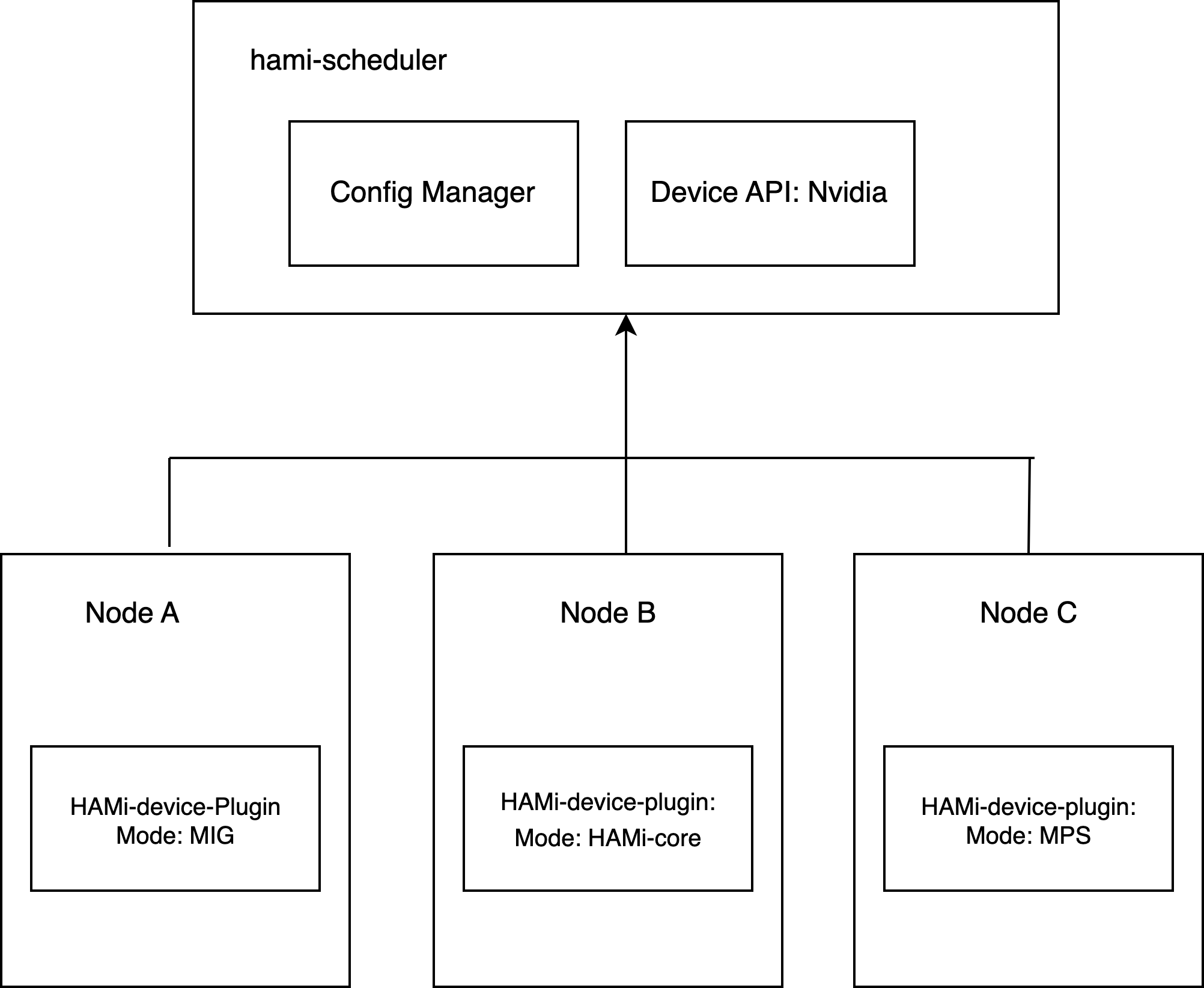
The device plugin is the hardware authority. The scheduler is the reservation authority. The Pod annotation is the durable handoff between them.
Examples
Dynamic MIG is compatible with HAMi tasks, as shown in the example below: Set nvidia.com/gpu and nvidia.com/gpumem.
apiVersion: v1
kind: Pod
metadata:
  name: gpu-pod1
spec:
  containers:
    - name: ubuntu-container1
      image: ubuntu:22.04
      command: ["bash", "-c", "sleep 86400"]
      resources:
        limits:
          nvidia.com/gpu: 2 # requesting 2 vGPUs
          nvidia.com/gpumem: 8000 # Each vGPU contains 8000m device memory (Optional,Integer)
A task can decide only to use mig or hami-core by setting annotations.nvidia.com/vgpu-mode to corresponding value, as the example below shows:
apiVersion: v1
kind: Pod
metadata:
  name: gpu-pod1
  annotations:
    nvidia.com/vgpu-mode: "mig"
spec:
  containers:
    - name: ubuntu-container1
      image: ubuntu:22.04
      command: ["bash", "-c", "sleep 86400"]
      resources:
        limits:
          nvidia.com/gpu: 2 # requesting 2 vGPUs
          nvidia.com/gpumem: 8000 # Each vGPU contains 8000m device memory (Optional,Integer)
Procedures
The Procedure of a vGPU task which uses dynamic-mig is shown below:
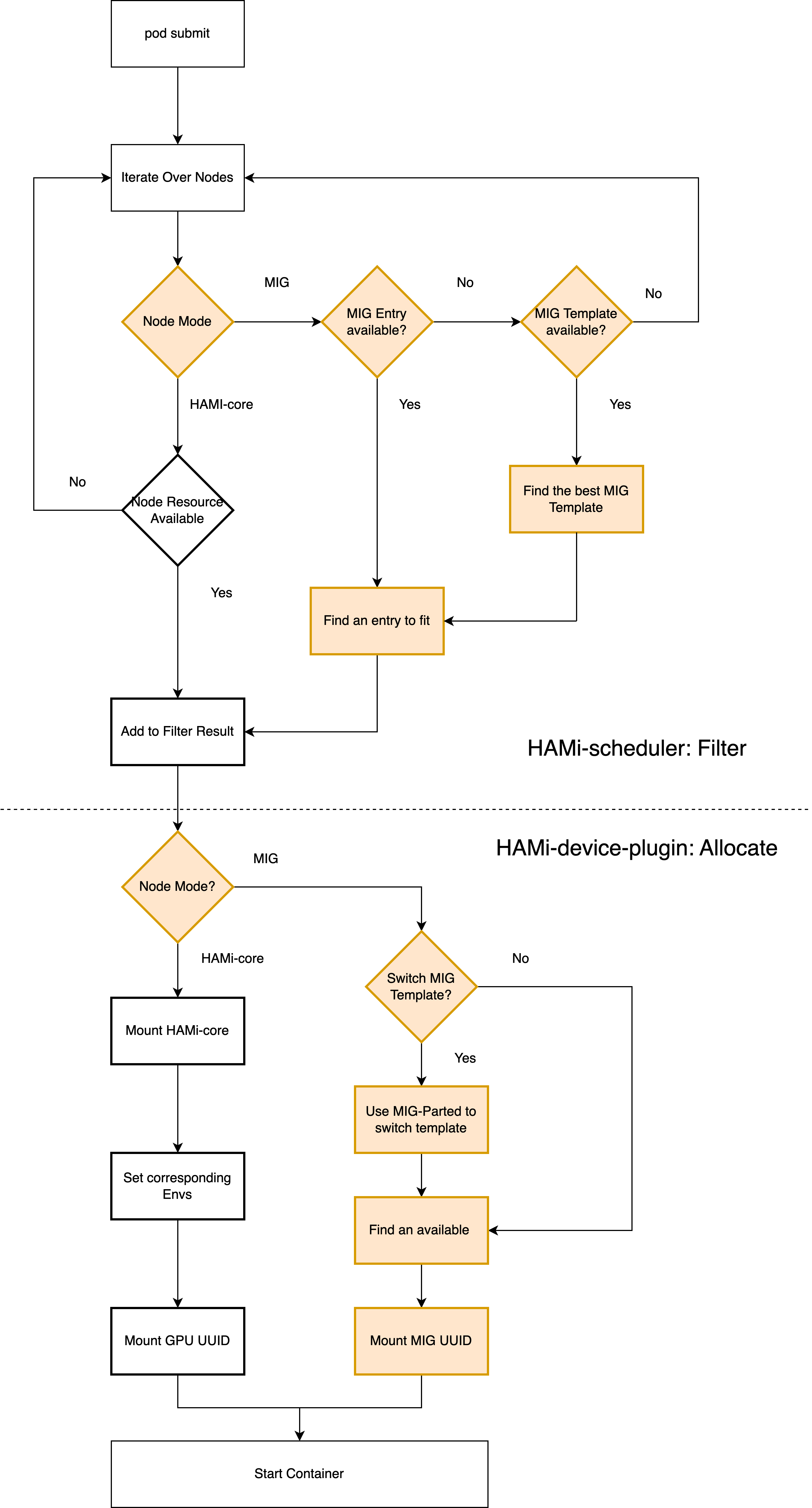
After submitting a task, the scheduler matches nvidia.com/gpumem to an allowlisted profile and picks a legal free placement. Occupancy is the interval [start, start + size). You can change migProfileAllowlist in ConfigMap hami-scheduler-device and restart the scheduler and device plugin.
If you submit the example on an empty A100-PCIE-40GB node, the scheduler selects 2g.10gb (the smallest allowlisted profile with at least 8000 MiB) twice, with non-overlapping placements, and the device plugin creates two 2g.10gb instances.
Do not edit hami.io/vgpu-mig-allocations. Incomplete or legacy GPU-UUID[template-slot] identities cannot be adopted safely; drain geometry-based MIG Pods before upgrading to v2.10.0. See Migrating to HAMi Dynamic MIG and Dynamic MIG Architecture.
